
Techstreat Solutions

Please fill out the form below if you have a plan or project in mind that you'd like to share with us.
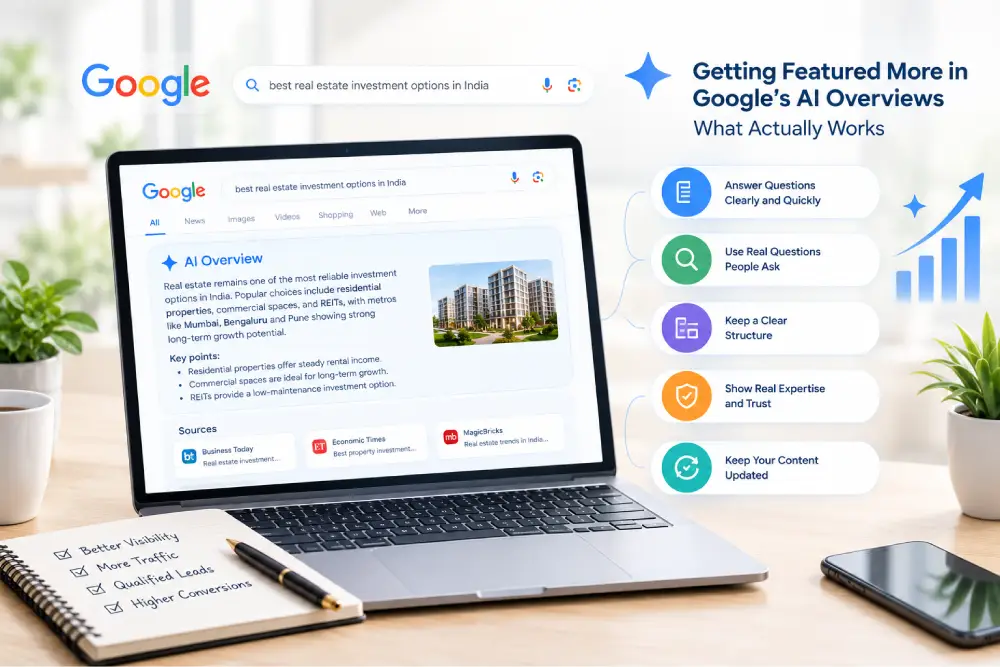
Search on Google has changed. For many questions, you no longer see a plain list of blue links first. You see a short answer written by AI at the very top of the page. This box is called Google AI Overviews.
If your business is mentioned in that box, more people see your name. If it is not, your competitor might get that attention instead.
So how do you get featured? The honest answer is that nobody can promise a spot. Google does not give a secret button. But there are clear steps that help your content get picked more often, and most of them are simple.
In this guide, we explain what AI Overviews are, how Google picks content for them, and the things that actually work. We also share tips for real estate companies and business owners across India. We use simple words, so you can start right away.
Google AI Overviews are short, AI-written summaries that show at the top of some search results. They give a quick answer to a question and show links to the websites the answer came from.
For example, if someone searches "how to choose a good flat in Navi Mumbai," Google may show a short summary with key points. Next to it, you may see small links to the pages that helped build that answer.
An AI Overview is different from a featured snippet. A featured snippet usually takes one answer from one page. An AI Overview can join ideas from several pages and show many sources. That means more than one website can get a mention.
There is also a warning. Some people read the AI answer and do not click anything. So just ranking on page one is no longer enough. You want to be part of the answer itself.
Google does not share the full list of rules. But Google's own guidance says the same basic SEO work still applies. Your page must be indexed, it must be allowed to show in search, and it must be helpful for people. You can read this in Google's guide on AI features and your website.
From what experts see in real searches, pages that get picked often have these things in common:
Keep this list in mind. The tips below are built on it.
Many pages start with a long story before they reach the point. AI tools like short, clear answers.
Under each main heading, write a direct answer in the first two or three lines. Then explain in more detail below.
Example: If your heading is "What is RERA?", start with: "RERA is a law that protects home buyers and makes real estate projects more open and fair." Then add the details.
Think of it like a news story. The key point comes first, and the extra detail follows.
People do not search like robots. They ask full questions, like "How much does a website cost for a small business?" or "Which area is best for investment in Pune?"
Find these questions and use them as headings. Good places to look:
Answer each question in simple words. Longer, question-style searches are where AI Overviews show up most often.
A page that is easy for people to read is also easy for Google to understand.
A table is a great way to show side-by-side details. AI tools can pick up clean lists and tables with ease.
Google wants to show answers from people who know the topic. This idea is often called E-E-A-T, which stands for experience, expertise, authority, and trust.
You can show it in simple ways:
Copied or thin content does not work well. Write what you really know. Your own experience is something no one else can copy.
One short blog rarely answers everything. Google likes websites that go deep on a subject.
Create a main guide and then support it with smaller posts. For example, a main guide on "SEO for real estate" can link to smaller posts on:
Link these posts to each other. This helps Google see that your website knows the whole topic, and it helps visitors find more answers on your site.
If Google cannot read your page, it cannot use it. Check these simple things:
These steps are basic, but many websites skip them.
Schema markup is a small piece of code that tells Google what your page is about. It can mark things like articles, FAQs, your business, your reviews, and your products.
You can learn the full list of types at Schema.org. Common ones to use are Article, Organization, LocalBusiness, and FAQPage.
One honest note: schema alone will not push you into an AI Overview. It helps Google understand your page, and that is helpful, but it is only one piece of the plan. The quality of your content matters more.
Old content can lose its place. Prices change, rules change, and new tools appear.
Review your top pages every few months. Update facts, add new examples, fix broken links, and show the "last updated" date. For real estate, this could mean new prices, new offers, or updated project status. If your page looks outdated, Google and your readers will trust it less.
Google also looks at what others say about you. Strong signals include:
Ask happy customers for reviews. Share your knowledge in guest posts and local news sites. Over time, this builds a name that Google can trust.
| No. | What to Do | Why It Helps | Quick Tip |
| 1 | Give the answer first | AI tools can pick short, clear answers | Put the key point in the first 2–3 lines |
| 2 | Target real questions | Matches how people search | Use question-style headings |
| 3 | Use clear structure | Easy to read and understand | Add lists and tables |
| 4 | Show real experience | Builds trust | Add author bio and case studies |
| 5 | Cover the whole topic | Shows deep knowledge | Link related posts together |
| 6 | Fix technical basics | Google can read your page | Check Search Console and speed |
| 7 | Add schema markup | Explains your page to Google | Use Article, FAQ, and LocalBusiness |
| 8 | Keep content fresh | Shows the page is current | Review top pages every few months |
| 9 | Build outside trust | Proves your brand is real | Get reviews and quality mentions |
Property buyers do a lot of research before they call anyone. They ask Google about locations, prices, builders, loans, and legal rules. That makes real estate a strong fit for AI Overviews. Here is how to use it:
You do not need a big budget to start. A clinic, a coaching class, a finance company, a travel agency, or a local shop can all use these steps. A few extra points:
There is no perfect tool, so keep it simple:
If competitors are being picked and you are not, open their pages and see what they do well. Then make your own page clearer, more useful, and more complete.
At Techstreat Solution, we help businesses get found online and turn visitors into customers. Our team has worked on many projects for real estate companies and business owners across India, and we know what works in real search results.
Here is what we can do for you:
Whether you are launching a new project or growing a small business, we plan a clear path from search to enquiry. To see more of what we do, visit the Techstreat Solution website.
Getting featured in Google AI Overviews is not about tricks. It is about being the most helpful, clear, and trusted answer for your audience.
Give direct answers. Write about real questions. Keep your pages well organised and up to date. Show your real experience. Fix your technical basics, and build trust through reviews and mentions. These steps help in normal Google search too, so your effort pays off in both places.
Start small. Pick your top five pages, improve them using the steps above, and track the results. Then keep going. Over time, your website can become a source that both people and Google rely on.
Techstreat Solution can help you build content and a website that ranks, gets noticed, and brings real leads. Tell us about your business, and our team will suggest the right plan for you.
Contact Techstreat Solution today and let's grow your business together.